Correct a submitted score
Correct a submitted judge sheet through the TallyTrot mobile app, then review and verify the complete result again in the scoring office.
Before changing the sheet
Confirm the correction with the scoring office and identify the exact event, class, ride, judge position, and movement. Do not change another judge's sheet.
Correction workflow
- The assigned judge opens the submitted sheet in the mobile app.
- The judge changes only the approved marks, comments, or deductions.
- The judge reviews and submits the corrected sheet.
- TallyTrot invalidates the current verification automatically.
- The scoring office opens the ride, reviews every sheet, and verifies the corrected cumulative result.
What the scoring office sees
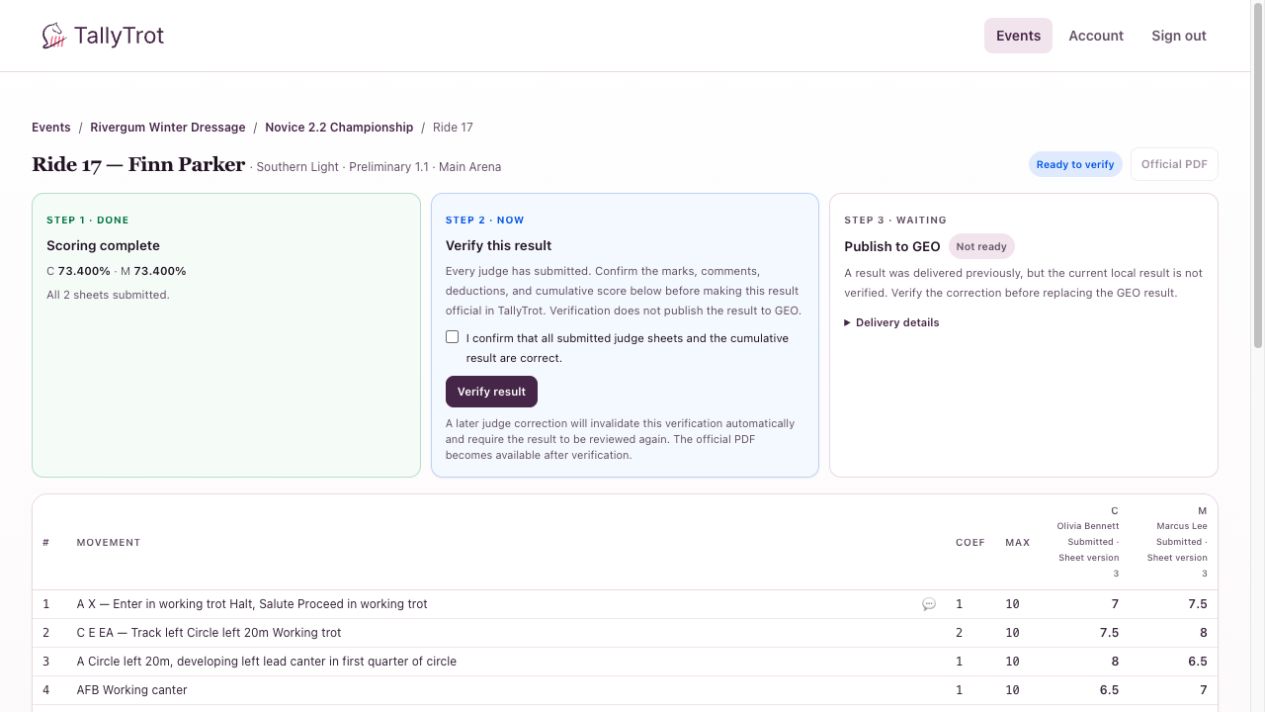
The example shows:
- both judge sheets submitted;
- the ride returned to Ready to verify;
- the official PDF unavailable for the unverified current version;
- a warning that an earlier result was delivered;
- GEO replacement blocked until the correction is verified.
Republish a corrected result
After verification, Step 3 changes to Publish corrected result. TallyTrot creates a new publication that explicitly supersedes the earlier delivered identity.
Never retry the old delivery to publish a correction. The old payload represents the previous official result.
If the correction is wrong
Stop before verification. Ask the assigned judge to correct and resubmit again. Keep the scoring-office review tied to the newest sheet version.
Success state
The corrected result is verified, a new official PDF is available, and any GEO replacement records the earlier publish ID as superseded.
Previous: Publish results · Next: Resolve a failed GEO delivery