Select dressage tests and finish class setup
Review every class after importing an event or CSV. A class should not begin scoring until its test, judge panel, entries, and publication settings are correct.
Review the programme
Open the event and use the competition-day tabs to inspect every class.
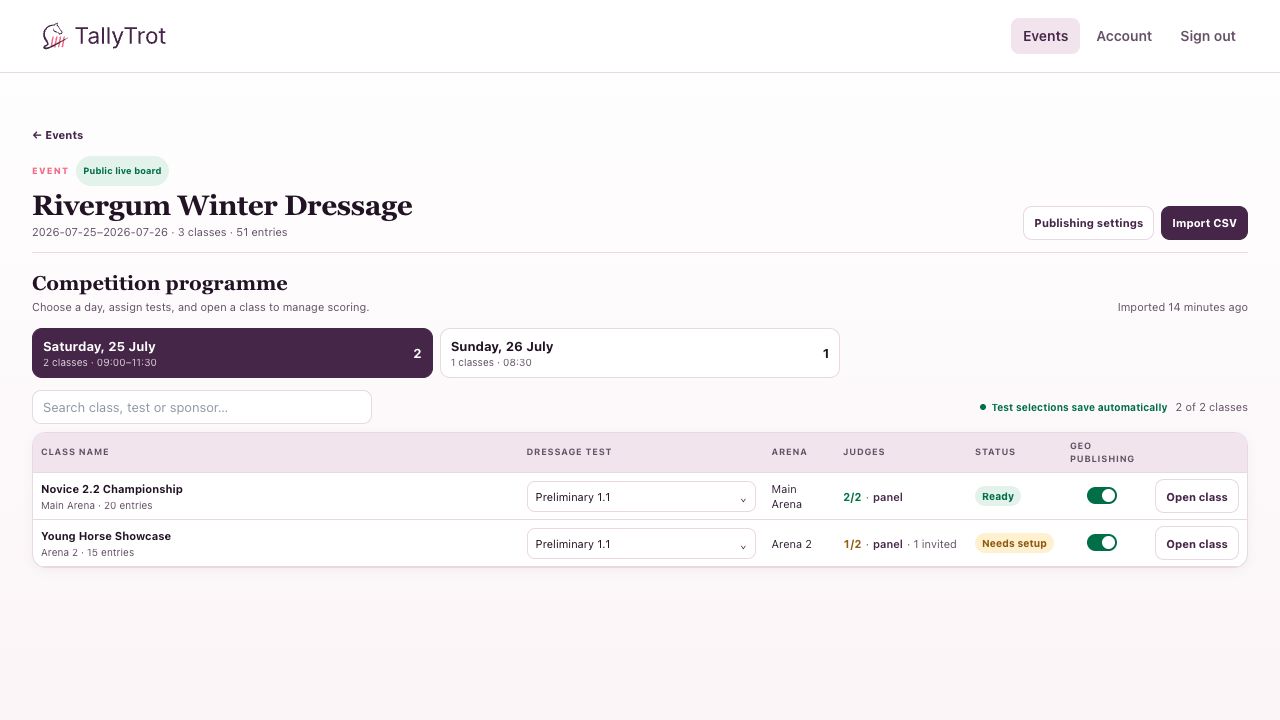
For each class:
- Confirm the class name, arena, date, time, and entry count.
- Open the dressage-test selector and choose the correct test.
- Wait for the Test selections save automatically confirmation.
- Select the panel link and confirm every required judge position.
- Decide whether the class can publish to GEO.
Understand the class status
- Ready means the class has a test, entries, and a fully assigned judge panel.
- Needs setup means one or more required parts are incomplete.
In the example, Novice 2.2 Championship is ready with 20 entries and a 2/2 panel. Young Horse Showcase still needs setup because one of its two judge positions is only invited, not assigned.
GEO publication
The class-level switch controls whether this class is eligible for GEO publication. It does not publish a result by itself.
Both gates must be on:
- Allow GEO publication in event publishing settings.
- The class-level GEO publishing switch.
Verification is still required before any result can be sent.
If the wrong test was selected
Change the selection before judging begins. If scoring has already started, stop and confirm the recovery process with the scoring office; changing a test can make existing marks incompatible with the class.
Success state
Every competition day has been checked, every active class shows Ready, and the event's publishing decisions match the organiser's instructions.
Previous: Import entries with a CSV file · Next: Assign and invite judges