Review and verify a result
Verification makes a completed result official in TallyTrot and creates access to the official score-sheet PDF. It does not publish the result to GEO.
Open a completed ride
From class progress, select Review & verify on a Ready to verify ride.
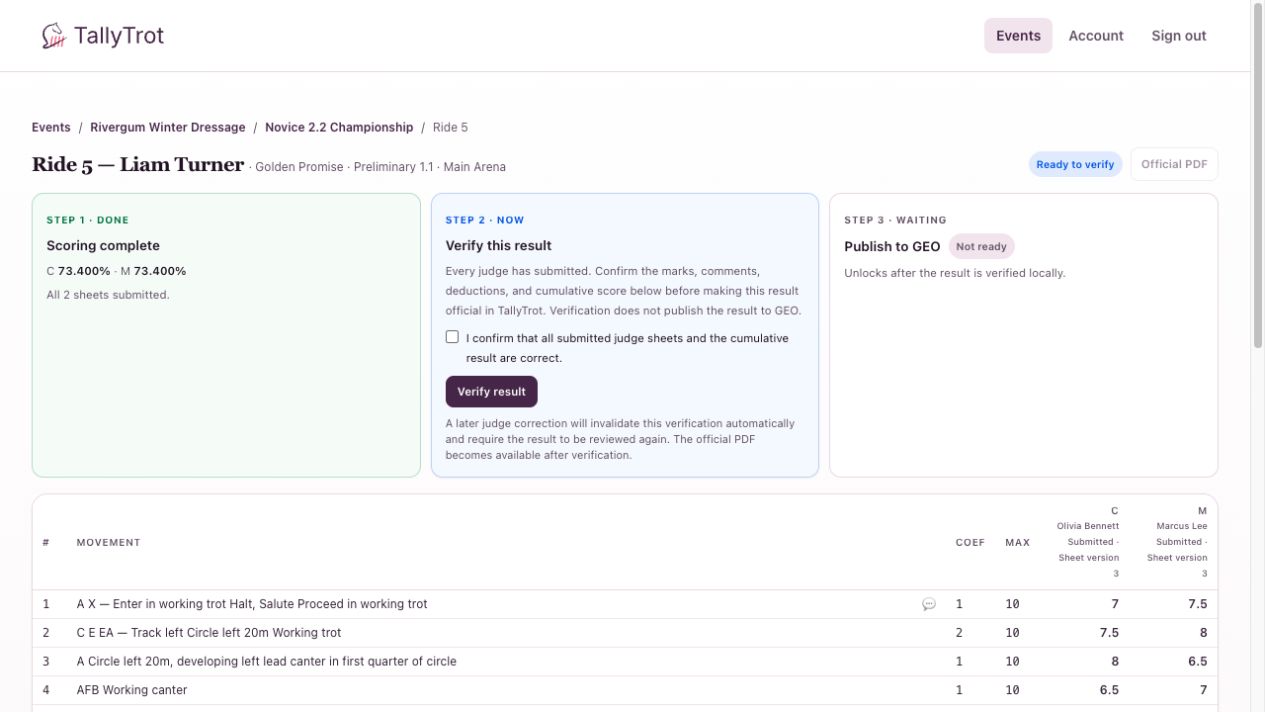
Review the result
- Confirm the rider, horse, draw number, class, test, and arena.
- Check that Scoring complete lists every assigned judge.
- Compare the movement and collective marks across judges.
- Open comment indicators where clarification is needed.
- Review errors of course, other deductions, totals, and the cumulative percentage.
Resolve any discrepancy before verification. If a judge needs to correct a submitted sheet, stop here and ask for that correction.
Verify
- Select I confirm that all submitted judge sheets and the cumulative result are correct.
- Select Verify result.
The result changes to Verified and Official locally. TallyTrot records who verified it and when.
What verification changes
- The official PDF becomes available.
- GEO publication becomes eligible when both publication gates are enabled.
- Repeating verification does not replace the original verification record.
- A later submitted-sheet correction removes the current verification automatically.
Important distinction
Verification and publication are separate controls. A verified result is official in TallyTrot but has not necessarily been delivered to GEO or displayed as final elsewhere.
Success state
Step 2 shows Result verified, the verifier and timestamp are visible, and the official PDF controls are enabled.