Resolve a failed GEO delivery
A failed GEO delivery does not remove local verification. TallyTrot saves the exact publication so it can be retried safely.
Open the failure
From class progress, select Review delivery on a Delivery failed ride.
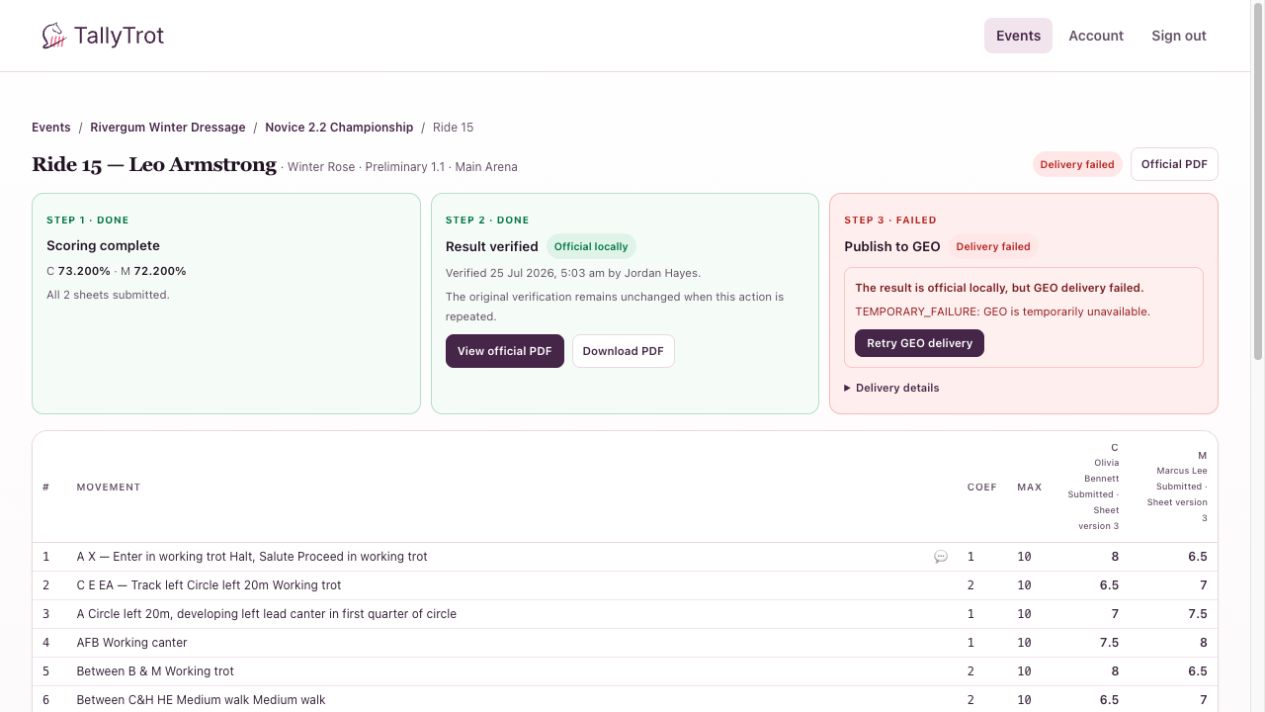
Review before retrying
- Confirm that Step 2 still shows Result verified.
- Read the error message in Step 3.
- Expand Delivery details and note the publish ID, attempt count, and receipt state.
- Decide whether the error is temporary or requires source-data correction.
In the example, TEMPORARY_FAILURE indicates the saved publication can be attempted again. A validation error may need the event or source entry corrected first.
Retry the saved publication
Select Retry GEO delivery only after the cause is understood.
The retry reuses the saved publication identity and payload. It does not recalculate the score or create a replacement result.
Do not retry when
- the judge sheet has changed;
- local verification has been invalidated;
- the source entry identity is known to be wrong;
- the error requires an organiser or GEO administrator;
- the intended action is to publish a corrected result.
Corrected results must be verified and published as a new superseding publication.
Success state
Step 3 changes to Delivered, the receipt is recorded, the attempt count increases, and the class progress row changes to Published.
Previous: Correct a submitted score · Next: View or download the official score sheet